Discord連携方法
How to connect Discord
Discord 연동 방법
Discord 绑定方法
Discord 綁定方式
Gumroad で Standard plan を購入したあと、Discord の支援者用チャンネルを見られるようにする手順です。
After buying the Standard plan on Gumroad, follow these steps to unlock the supporter channels on Discord.
Gumroad에서 Standard plan을 구매한 뒤, Discord 후원자 전용 채널을 볼 수 있게 하는 방법입니다.
在 Gumroad 购买 Standard plan 后,按以下步骤即可查看 Discord 的支持者专属频道。
在 Gumroad 購買 Standard plan 後,依照以下步驟即可查看 Discord 的支持者專屬頻道。
Discord サーバーに参加する
Join the Discord server
Discord 서버에 참가하기
加入 Discord 服务器
加入 Discord 伺服器
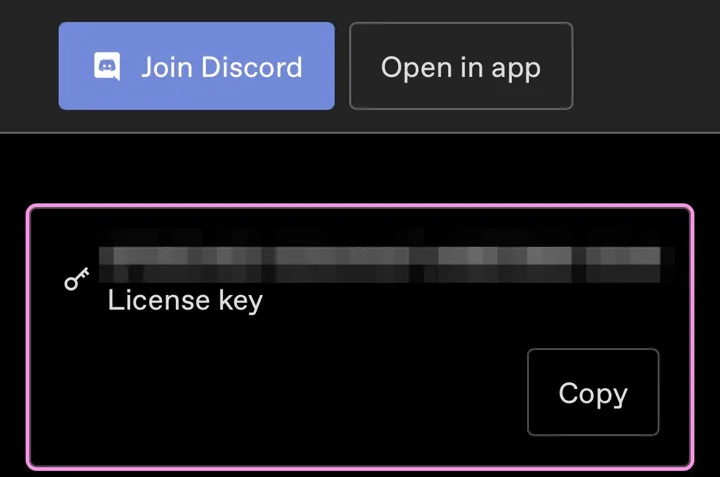
購入後のページ上部にある「Join Discord」を押してください。
On the page you see after purchase, press "Join Discord" at the top.
구매 후 페이지 위쪽에 있는 "Join Discord"를 눌러 주세요.
在购买后的页面顶部点击「Join Discord」。
在購買後的頁面上方點選「Join Discord」。
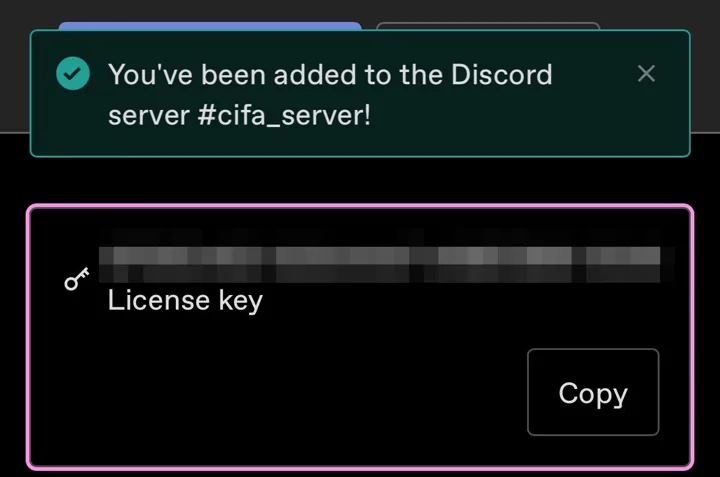
「You've been added to the Discord server」と表示されれば参加できています。
If you see "You've been added to the Discord server", you're in.
"You've been added to the Discord server"가 표시되면 참가된 것입니다.
显示「You've been added to the Discord server」即表示已加入。
顯示「You've been added to the Discord server」即表示已加入。
ライセンスキーをコピーする
Copy your license key
라이선스 키 복사하기
复制许可证密钥
複製授權金鑰
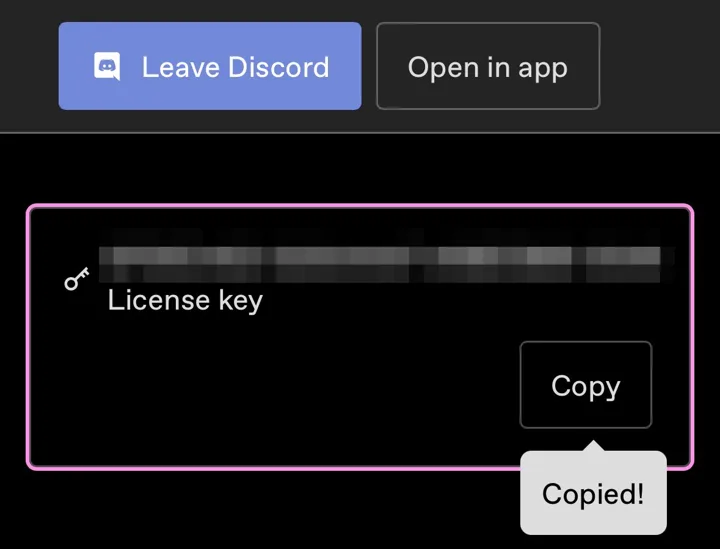
同じページの「License key」にある「Copy」を押します。キーは購入時のメールにも載っています。
Press "Copy" under "License key" on the same page. The key is also in your purchase email.
같은 페이지의 "License key"에 있는 "Copy"를 누릅니다. 키는 구매 시 받은 메일에도 적혀 있습니다.
在同一页面的「License key」处点击「Copy」。密钥也写在购买时收到的邮件里。
在同一頁面的「License key」處點選「Copy」。金鑰也寫在購買時收到的郵件裡。
キーは他の人に教えないでください。
Please don't share your key.
키는 다른 사람에게 알려 주지 마세요.
请勿将密钥告诉他人。
請勿將金鑰告訴他人。
#auth-gumroad で認証する
Verify in #auth-gumroad
#auth-gumroad에서 인증하기
在 #auth-gumroad 验证
在 #auth-gumroad 驗證
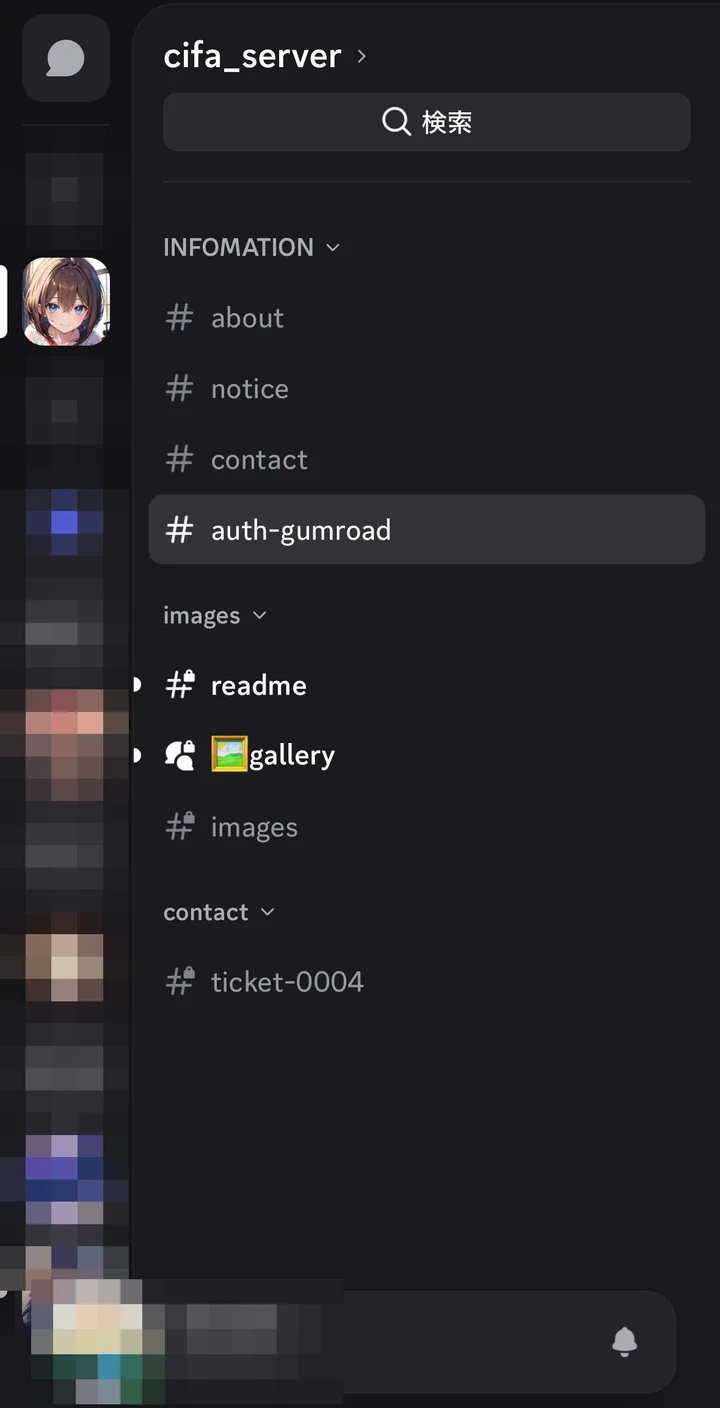
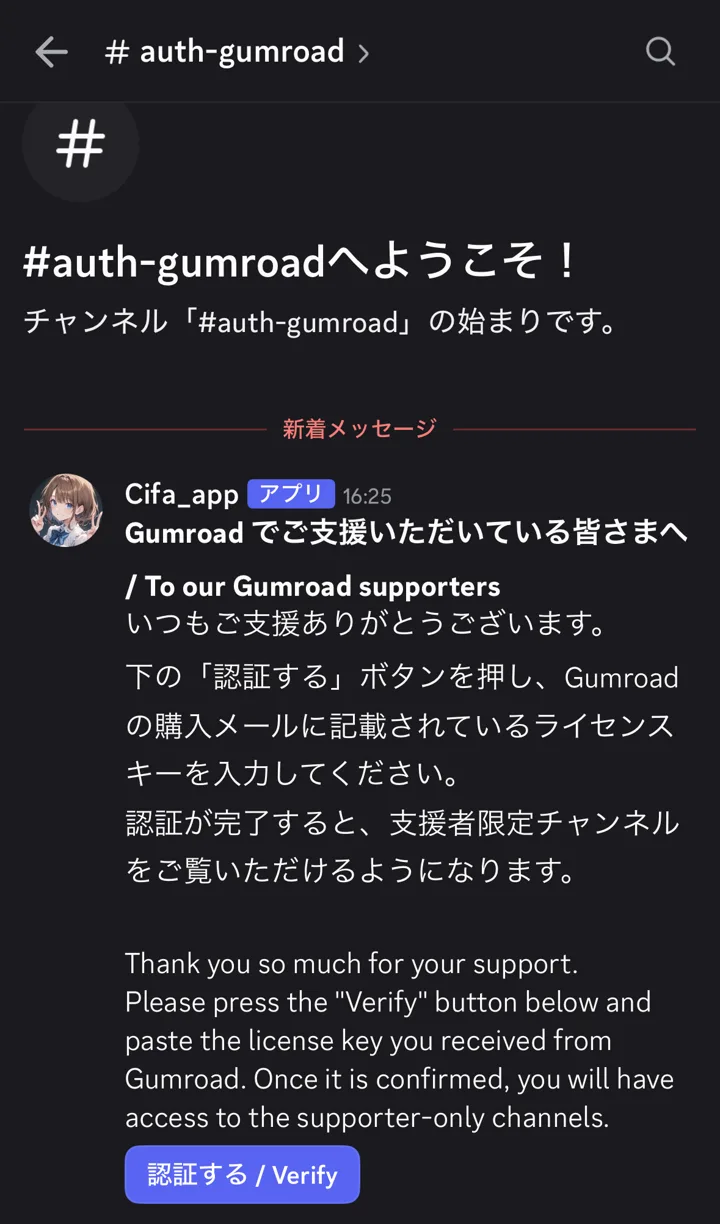
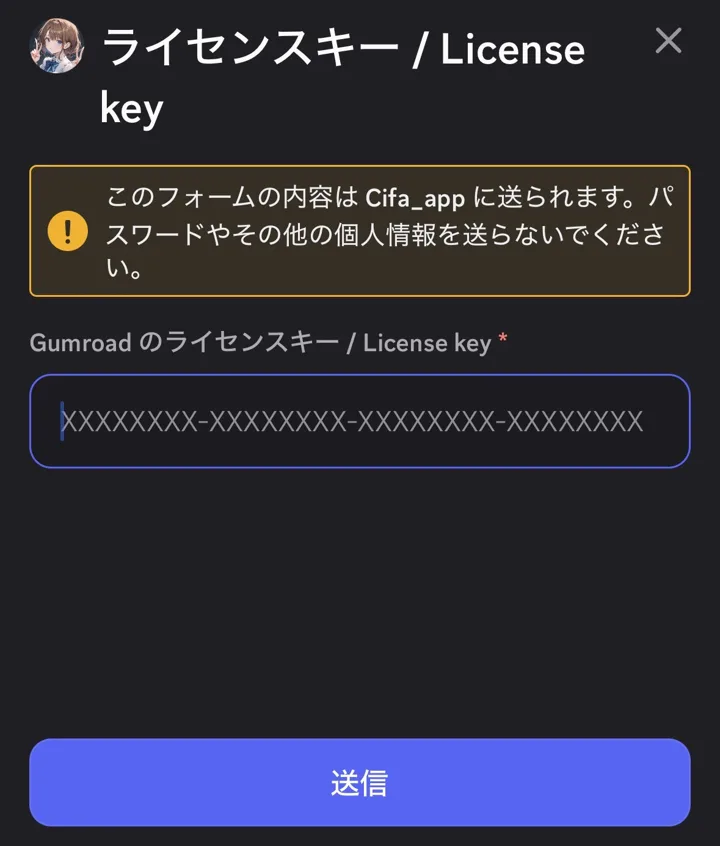
Discord を開くと、左のサーバー一覧に「cifa_server」が増えています。それを押して移動し、チャンネル一覧の #auth-gumroad を開いてください。そこで「認証する / Verify」を押し、コピーしたキーを貼り付けて「送信」を押します。
Open Discord. A new server, "cifa_server", appears in the server list on the left. Click it, then open the #auth-gumroad channel in the channel list. Press "認証する / Verify", paste the key, and press Submit.
Discord를 열면 왼쪽 서버 목록에 "cifa_server"가 추가되어 있습니다. 그것을 눌러 이동한 뒤, 채널 목록에서 #auth-gumroad를 여세요. "認証する / Verify"를 누르고, 복사한 키를 붙여 넣은 뒤 "제출"을 누릅니다.
打开 Discord,左侧服务器列表中会出现「cifa_server」。点击进入后,在频道列表中打开 #auth-gumroad。点击「認証する / Verify」,粘贴复制的密钥后点击「提交」。
打開 Discord,左側伺服器列表中會出現「cifa_server」。點選進入後,在頻道列表中打開 #auth-gumroad。點選「認証する / Verify」,貼上複製的金鑰後點選「提交」。
完了
Done
완료
完成
完成
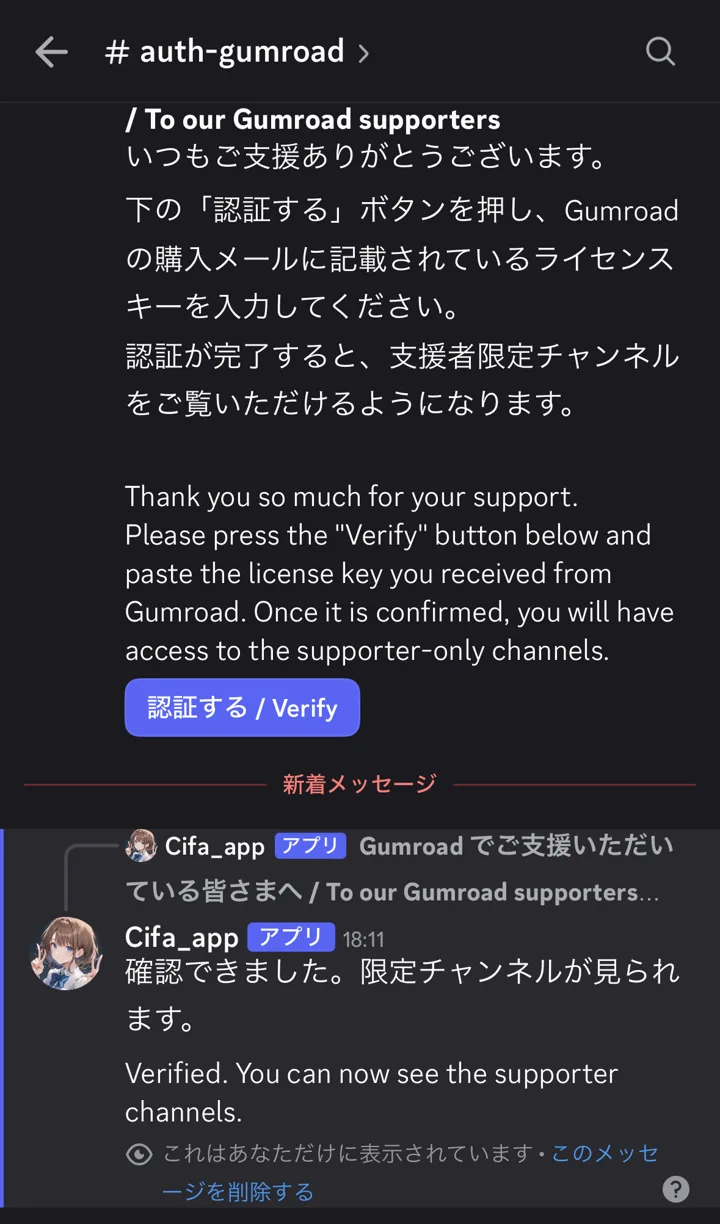
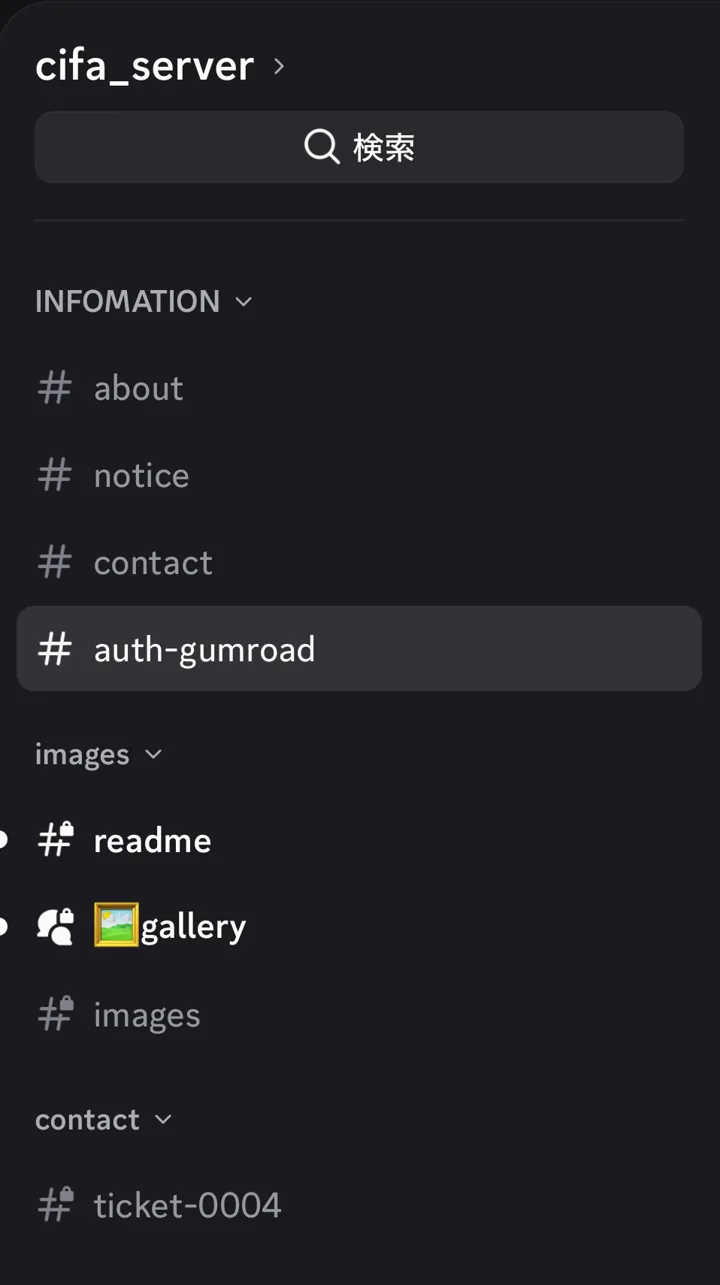
「確認できました。限定チャンネルが見られます。」と出たら完了です。チャンネル一覧に #images と #gallery が表示されます。使い方は #readme をご覧ください。
When you see "Verified. You can now see the supporter channels.", you're done. #images and #gallery will show up in your channel list. See #readme for how to use them.
"Verified. You can now see the supporter channels."가 나오면 완료입니다. 채널 목록에 #images와 #gallery가 표시됩니다. 사용법은 #readme를 확인해 주세요.
出现「Verified. You can now see the supporter channels.」即完成。频道列表中会出现 #images 和 #gallery。使用方法请看 #readme。
出現「Verified. You can now see the supporter channels.」即完成。頻道列表中會出現 #images 和 #gallery。使用方式請看 #readme。
困ったときは
Troubleshooting
문제가 있을 때
遇到问题时
遇到問題時
ボタンが反応しない
The button doesn't respond
버튼이 반응하지 않을 때
按钮没有反应
按鈕沒有反應
Discord を再起動してから、もう一度押してください。
Restart Discord and try again.
Discord를 다시 시작한 뒤 다시 눌러 주세요.
请重启 Discord 后再点一次。
請重新啟動 Discord 後再點一次。
キーが通らない
The key is rejected
키가 인증되지 않을 때
密钥无法通过
金鑰無法通過
キーの前後に空白が入っていないか確認してください。
Make sure there are no spaces before or after the key.
키 앞뒤에 공백이 들어가 있지 않은지 확인해 주세요.
请确认密钥前后没有多余的空格。
請確認金鑰前後沒有多餘的空格。
Discord に入れない場合
If you can't get into Discord
Discord에 들어갈 수 없을 때
无法进入 Discord 时
無法進入 Discord 時
Discord への参加や認証ができないときは、cifa896@gmail.com までメールでご連絡ください。
If you can't join the server or complete verification, please email cifa896@gmail.com.
서버 참가나 인증이 되지 않을 때는 cifa896@gmail.com 로 메일 주세요.
如果无法加入服务器或进行验证,请发邮件至 cifa896@gmail.com。
如果無法加入伺服器或進行驗證,請寄信至 cifa896@gmail.com。
解決しない場合
If it still doesn't work
해결되지 않을 때
仍无法解决时
仍無法解決時
Discord の #contact にある「Contact / お問い合わせ」から連絡してください。
Contact me from "Contact / お問い合わせ" in the #contact channel on Discord.
Discord의 #contact 채널에 있는 "Contact / お問い合わせ"로 연락해 주세요.
请通过 Discord #contact 频道里的「Contact / お問い合わせ」联系我。
請透過 Discord #contact 頻道裡的「Contact / お問い合わせ」聯絡我。
Gumroad のページへ戻るBack to GumroadGumroad 페이지로 돌아가기返回 Gumroad返回 Gumroad